
{"time":1768993760276,"blocks":[{"id":"jIo5gJfe-U","type":"header","data":{"text":"Import Opportunities from external systems via Amazon S3","level":2}}],"version":"2.26.5"}
{"time":1768993760275,"blocks":[{"id":"MoJx2t5ftP","type":"paragraph","data":{"text":" Stop switching tools to bring in external opportunities "}},{"id":"kr9TDm9jqJ","type":"paragraph","data":{"text":"Import opportunities directly from external sources like Jira Product Discovery, Aha!, or Productboard using our time-saving connector. Once imported, they behave like native opportunities in TheyDo. Link them to insights, embed them in journeys, and collaborate seamlessly across your workflow."}},
What's new
Import Opportunities from external systems via Amazon S3
Stop switching tools to bring in external opportunities
Import opportunities directly from external sources like Jira Product Discovery, Aha!, or Productboard using our time-saving connector. Once imported, they behave like native opportunities in TheyDo. Link them to insights, embed them in journeys, and collaborate seamlessly across your workflow.
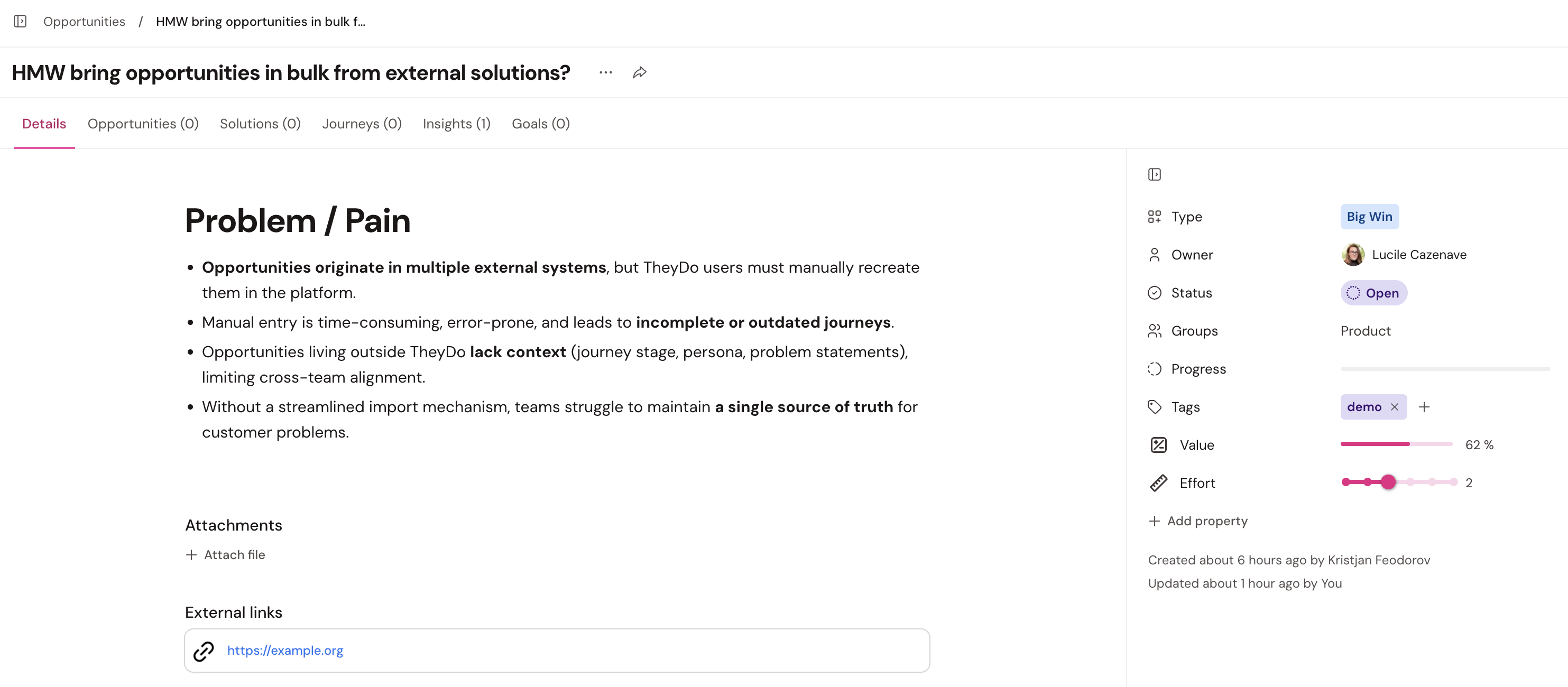 Example of an imported opportunity
What’s new?
You can now connect Amazon S3 and bring in opportunities you store elsewhere, so your teams can collaborate in TheyDo without duplicating effort. Once imported, these opportunities behave just like native ones.
Using the Amazon S3 connector, you can import opportunities and immediately:
- Open them from the workspace library
- View the full markdown content
- Link back to the original opportunity in your external system
- Bring in metadata including type, owner, status, groups, and tags
Note: Value and effort still need to be assigned inside TheyDo—for now!
Use them everywhere: imported opportunities can be linked to insights and dragged into any journey where they make sense.
Getting started
1. Go to Settings → Integrations.
2. Select Amazon S3.
3. Choose one of two setup paths:
◦ Contact us directly via "Contact us" in Settings -> Integrations ◦ Speak with your CSM, who will guide you through the same setup process
Once we have your details, we’ll get everything configured for you.
---
🍿 Watch the video that explains in detail
📖 More information is available in the Help Center.
Enjoy exploring this new integration—and let us know what you think!